
Yamong Platform · AI Guardrail
Allow only the scope this request needs.
Within registered tool limits, interpret request intent and inspect returned tool instructions before they reach the agent.
CAPABILITIES
Check registered tool limits, request intent, and returned instructions in sequence.
Registered tool ceiling
- Input
- Tools registered for the agent through Identity
- Review
- Limit which tools can be used for this request
- Result
- The tool set available to the request
Request intent and resource scope
- Input
- User request and connected tool/resource policy
- Review
- Set the required tools and allowed files or paths per request
- Result
- The allowed scope for this request
Inspect returned call instructions
- Input
- Tools, arguments, and target paths returned by the LLM
- Review
- Compare with the defined scope and hold out-of-scope instructions before forwarding
- Result
- Only in-scope instructions are forwarded to the agent
Recheck revised instructions
- Input
- A revised tool call
- Review
- Check against the existing tool and resource scope
- Result
- Forward if it passes, or hold it again
SCENARIOS
Follow the decision from request to next step.
Illustrative workflows based on the console examples.
Scenario 01
Prepare a September report from monthly data
Boan Kim requests Project A’s September report. Allowed tools are files.read and docs.create, scoped to September summary data and the team reports folder.
- Input
- Request: Project A’s September report. Returned instruction: read /projects/A/2024-2026/all.csv.
- Product decision
- Hold the all-period read and request a revision to /projects/A/2026/09/summary.csv. Recheck the revised read instruction against the same allowed scope.
- Output / next step
- Forward the read instruction after it passes. The report destination is /marketing-1/reports/A-2026-09.docx; the business system authorizes the actual write.
Scenario 02
Write a weekly customer-support summary
The agent reads a customer-support summary and writes this week’s team report.
- Input
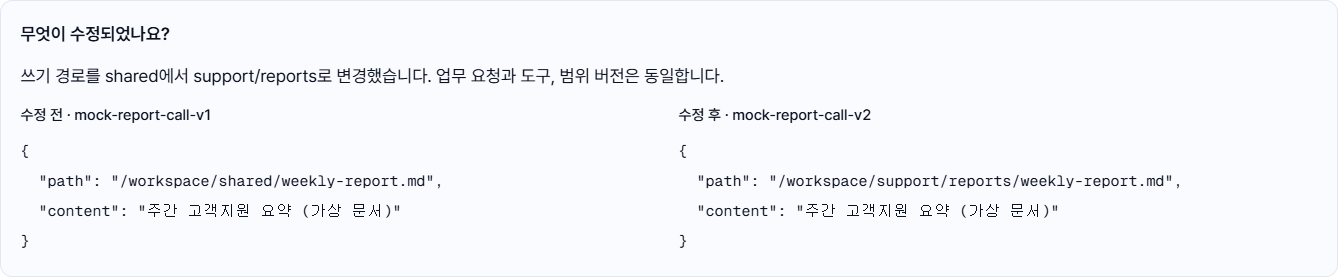
- Registered files.read/files.write tools, request path /workspace/support/reports/, returned write target shared
- Product decision
- Even though files.write is registered, hold the shared path because it exceeds this request’s scope and ask for a reports-path revision.
- Output / next step
- Forward the revised call only after it passes the same request-scope check
Illustrative workflows. Actual access is subject to the connected business system’s authentication and authorization.
INTEGRATIONS AND SCOPE
Review the scope for your environment.
Guardrail checks tool selection and call instructions before forwarding them to the agent. The business system continues to perform its own authentication and authorization when files are accessed.