
Yamong Platform · AI Security Posture
Find review paths across connected permissions and assets.
Connect AI roles, external identities, and accessible assets to inspect paths and the evidence behind them.
Korean console · demo data
CAPABILITIES
Select a potential path in the relationship graph and inspect its supporting evidence.
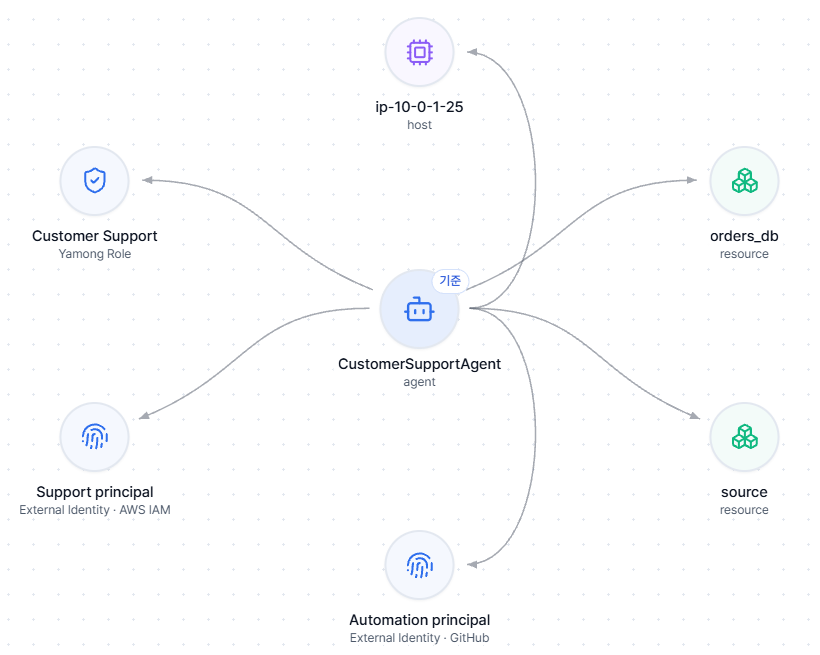
Role, identity, and asset graph
- Input
- Agent, Yamong role, external identity such as AWS IAM or GitHub, and resources
- Review
- Review relationships among the connected elements
- Result
- Relationship context in a graph
Select a potential path
- Input
- Graph relationships from agent through role and identity to an asset
- Review
- Select a candidate path for review
- Result
- A relationship that needs further verification
Permission and binding evidence
- Input
- IAM role, policies, and bindings connected to the selected path
- Review
- Inspect configuration evidence supporting the relationship
- Result
- Permission configuration evidence for review
Prioritize with asset context
- Input
- Connected assets and inspected permission evidence
- Review
- Consider sensitivity and relationship evidence together
- Result
- A human follow-up review priority
SCENARIOS
Follow the decision from request to next step.
Illustrative workflows based on the console examples.
Scenario 01
Review a Customer Support path
A Customer Support role is linked to an AWS IAM identity and orders_db and source assets.
- Input
- Selected path: agent → Customer Support role → AWS IAM → orders_db
- Product decision
- Inspect the AWS IAM link, policy and permission bindings, and relationship to the target asset in turn.
- Output / next step
- Verified configuration evidence and a potential path marked for additional validation
Scenario 02
Prioritize a repository connection for review
The same relationship graph shows an external identity linked to the source repository.
- Input
- Identity link, role, and repository-related permission bindings on the selected path
- Product decision
- Check whether policy and binding evidence support the connection, then consider the asset context.
- Output / next step
- A follow-up review order; the graph candidate alone does not establish actual access or a successful attack
Illustrative workflows. Actual access is subject to the connected business system’s authentication and authorization.
INTEGRATIONS AND SCOPE
Review the scope for your environment.
Potential paths in the graph identify relationships for further review. They do not by themselves prove an attack path or successful access; permission and binding evidence must be checked.